Hreflang Tags: Reaching a Global Audience with Local Relevance
Expanding your website’s reach to a global audience requires more than just translation—it demands proper localization to serve users in their preferred language and region. This is where hreflang tags play a crucial role in international SEO by ensuring that the right language version of a webpage appears in search results for the correct audience.
Key takeaways
- Hreflang tags tell search engines which language and regional version of a page to show each searcher; they never redirect anyone.
- Add them in the HTML head, HTTP headers or XML sitemap, but use only one method per site; sitemaps scale best for large sites.
- Every version must list all others and itself, with valid ISO codes such as en-gb, not en-uk; en and en-us may share a URL, but one value must never point to two URLs.
- Each language version should self-canonicalise, and Google only reads hreflang on canonical URLs, so paginated and parameter pages need care.
- Search Console has no hreflang report any more; test with Screaming Frog, Ahrefs or Semrush site audits, or Merkle's free hreflang tool.
What Are Hreflang Tags?
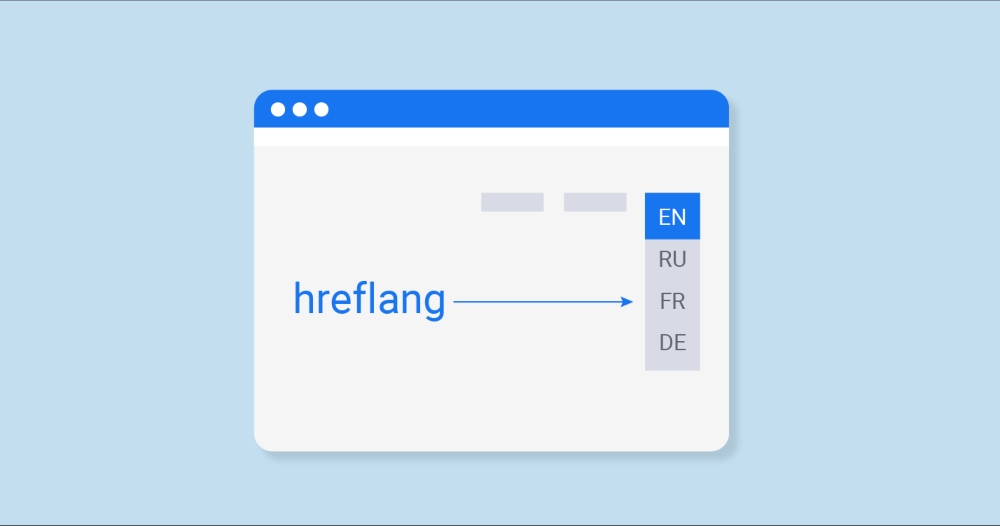
Hreflang tags are HTML attributes that tell search engines which language and regional version of a webpage should be displayed to users based on their location and language settings. These tags help prevent duplicate content issues by signaling search engines that similar pages are meant for different audiences.
For example, if your website has separate pages for English (US) and English (UK) users, hreflang tags ensure that US visitors see the “en-us” version while UK visitors see the “en-gb” version, improving both user experience and SEO rankings.
How Search Engines Use Hreflang for Localization
When search engines crawl a website, they analyze hreflang attributes to determine the appropriate language version to serve users based on:
- User’s Browser Language: If a user’s browser is set to Spanish, Google prioritizes the Spanish version of the site.
- Search Query & Geolocation: Google considers the user’s location (e.g., Canada vs. France) and search language to display the most relevant version.
- Hreflang & Canonical Tags Together: Ensuring that hreflang tags work alongside canonical tags prevents ranking conflicts and maintains SEO integrity.
Importance of Hreflang for Global SEO

As businesses expand globally, ensuring users find the right content in their preferred language and region becomes essential. Without proper language targeting, websites risk losing visibility, facing duplicate content issues, and providing a poor user experience. Hreflang tags solve these problems by guiding search engines to serve the correct language version of a webpage to users in different locations.
Enhancing Regional Search Visibility
Hreflang tags help search engines understand which page version to show based on user location and language preferences. This significantly improves regional SEO performance by ensuring that:
- Users see the most relevant version of a page in their country-specific Google search results.
- Local audiences are targeted accurately, leading to higher rankings in country-specific search engines (e.g., Google.com.au for Australia, Google.de for Germany).
- Multi-language businesses maintain clear segmentation, allowing better targeting across different demographics.
For example, suppose an e-commerce website serves both France (fr) and Canada (fr-ca). In that case, hreflang ensures that French-speaking users in Canada see the French-Canadian version instead of the France-specific version, improving search relevance and engagement.
Preventing Duplicate Content Issues
Without hreflang tags, Google might interpret different language versions of the same content as duplicate pages, which can result in:
- Keyword cannibalization, where multiple page versions compete against each other in rankings.
- Devaluation of SEO efforts, as search engines may consolidate ranking signals or ignore certain versions.
- Lower visibility in localized search results, reducing potential traffic.
Hreflang helps prevent this by explicitly signaling to search engines that similar content exists for different audiences rather than as duplicate spam. This ensures each page retains its ranking strength while serving the correct market.
Improving Search Relevance with Language Targeting
Hreflang changes which URL appears in the search results, nothing more. Done well, it means that:
- Searchers see the right version in the results for their language and country, so the click lands on the page meant for them.
- Fewer people land on the wrong language from search, which reduces pogo-sticking back to the results.
- Localized content resonates better, leading to improved dwell time and conversion rates.
For example, a Spanish-speaking user in Mexico should land on the es-mx version of a page, while a Spanish-speaking user in Spain should see the es-es version. Hreflang never redirects anyone, so a visitor who arrives on the wrong version from a direct link stays there; add a visible language switcher for them.
Implementation Methods of Hreflang Tags
Implementing hreflang tags correctly is crucial for international SEO success. There are three primary methods to apply hreflang annotations, each suited for different website structures and content types. Choosing the right method ensures that search engines interpret language and regional variations accurately without indexing conflicts.
HTML <head> Method (Basic Implementation)
The most common way to implement hreflang tags is by adding them directly within the <head> section of a web page’s HTML code. This method is suitable for small to medium-sized websites with multiple language versions.
How to Implement:
Add the following <link> elements inside the <head> of each page:
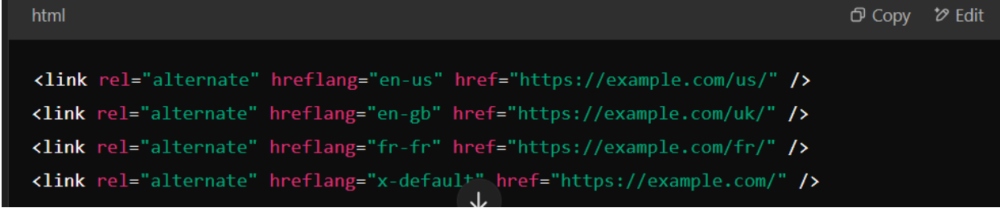
Key Points:
✅ Simple and effective for HTML-based pages.
✅ Ideal for small-scale multilingual sites.
❌ Can be difficult to manage for large websites with multiple versions.
HTTP Header Method (For Non-HTML Documents)
If your website serves PDFs, images, or other non-HTML content, hreflang tags must be applied through HTTP headers instead of HTML. This ensures search engines correctly associate non-HTML files with their corresponding language versions.
How to Implement:
Include hreflang tags in the HTTP response header like this:

Key Points:
✅ Best for non-HTML resources like PDFs or downloadable content.
✅ Works effectively when HTML modifications aren’t possible.
❌ Requires server-side configuration, making it complex for non-developers.
XML Sitemap Method (For Managing Large Multilingual Sites)
For large-scale websites with multiple language versions (e.g., e-commerce, news portals), implementing hreflang via XML sitemaps is more efficient and scalable than using inline HTML.
How to Implement:
Each page version must be listed in an XML sitemap with its corresponding hreflang attribute:
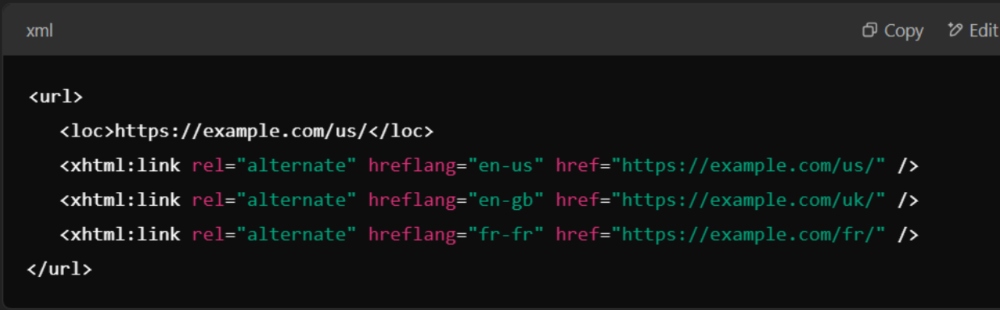
Key Points:
✅ Best for large, complex sites with multiple pages and languages.
✅ Keeps HTML cleaner by centralizing hreflang management in one file.
❌ Requires regular updates to ensure accuracy.
Which Hreflang Method Should You Choose?
| Method | Best For | Ease of Implementation | Scalability |
| HTML <head> | Small multilingual websites | ✅ Easy | ❌ Hard to scale |
| HTTP Header | PDFs, non-HTML documents | ❌ Complex | ✅ Moderate |
| XML Sitemap | Large, multilingual sites | ❌ Requires setup | ✅ Highly scalable |
For small sites, the HTML <head> method works best. For large-scale multilingual websites, the XML sitemap method is the most efficient. If you’re dealing with non-HTML files, use the HTTP header method.
Correct implementation of hreflang tags ensures proper language targeting, improves search engine visibility, and prevents indexing conflicts across global audiences.
Common Mistakes & How to Fix Them
Even with proper implementation, hreflang tags can cause issues if misconfigured. These mistakes can lead to indexing errors, incorrect page rankings, and poor user experience. Below are some of the most common hreflang errors and how to fix them.
Incorrect Language or Country Codes
Problem:
Using the wrong language or country codes can cause search engines to misinterpret the intended audience for a page.
🚨 Example of an Incorrect Hreflang Tag:

❌ Error: “en-UK” is not a valid hreflang code. The correct code should be “en-gb” (ISO 639-1 language + ISO 3166-1 country).
✅ Fix: Use the correct two-letter language and country codes as per ISO standards.

🔹 Tip: Always refer to Google’s language and region codes list for accuracy.
Missing Return Links
Problem:
Each hreflang tag must have a return link—if Page A references Page B, Page B must also reference Page A. Without return links, search engines might ignore your hreflang implementation.
🚨 Example of a Missing Return Link:
🚨 But Page B (French) doesn’t reference Page A:
✅ Fix: Ensure each hreflang tag has a corresponding return link to all other language versions.
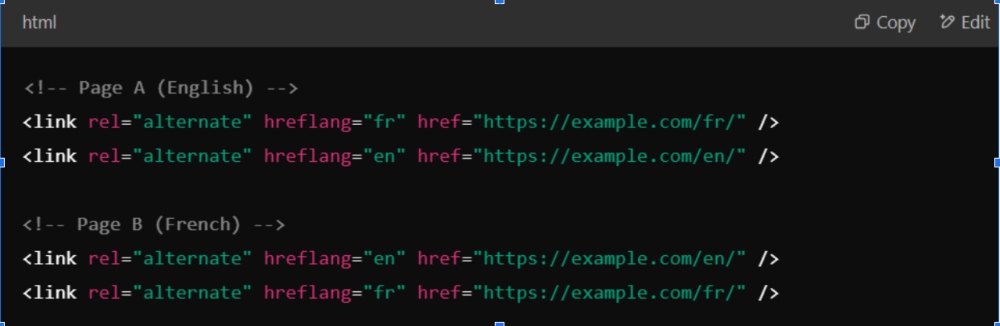
Tip: Use a crawler such as Screaming Frog, or Merkle's free hreflang testing tool, to verify return links. Search Console cannot do this.
Conflicting Hreflang Values
Problem:
Crawlers report hreflang conflicts when one hreflang value is mapped to two different URLs, or when a page carries hreflang that disagrees with its canonical tag. Pointing two values at the same URL is not a conflict.
🚨 Example that is often mistaken for an error:
Not an error: “en” and “en-us” pointing to the same URL is valid and common; it says the page serves all English speakers and US users in particular. The real conflict looks like this: hreflang="en-us" pointing to /us/ on one page and to /en/ on another.
Fix: Give each hreflang value exactly one URL across the whole set, make every page in the set list the same values, and make sure each listed URL is the canonical one.
🔹 Tip: A crawler report of “conflicting hreflang” almost always means one value maps to two URLs, or that a page's hreflang disagrees with its canonical. Fix the mapping, not the number of tags.
Canonical Tag Conflicts with Hreflang
Problem:
Hreflang tags and canonical tags must work together; otherwise, search engines may ignore hreflang and consolidate all versions under one canonical URL—which can lead to the wrong version ranking.
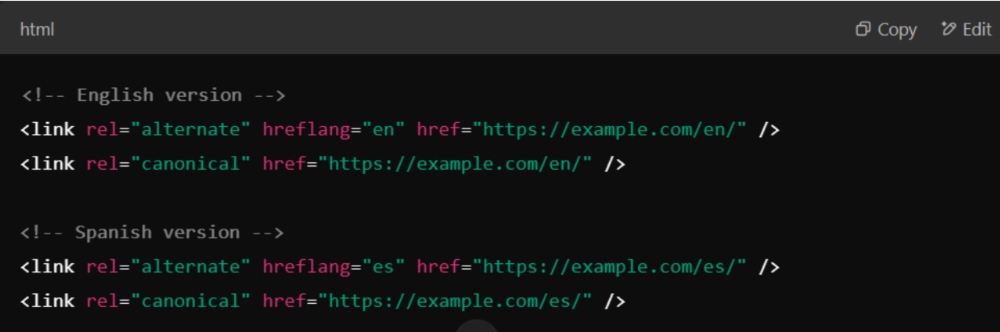
🚨 Example of a Canonical-Hreflang Conflict:

❌ Error: The Spanish version points to the English version as canonical, telling Google to ignore the Spanish page.
✅ Fix:
- Each localized version should self-canonicalize.
- Canonical should NOT point to another language version.
✔️ Correct Implementation:
Best Practices for Hreflang Implementation
Proper hreflang implementation is essential for accurate language targeting, improved search visibility, and better user experience. By following these best practices, you can ensure search engines understand your multilingual content correctly and display the right version to the right audience.
Using ISO 639-1 Language and ISO 3166-1 Country Codes
Hreflang tags rely on two standardized codes:
- ISO 639-1 for language codes (e.g., en for English, fr for French).
- ISO 3166-1 for country codes (e.g., US for the United States, CA for Canada).
🚨 Common Mistake:

❌ Error: “eng” and “france” are invalid codes.
✅ Correct Implementation:

🔹 Tip: Always refer to Google’s official hreflang guide for supported language and country code combinations.
Adding the x-default Hreflang for Fallback Versions
The x-default hreflang tag is crucial for handling users whose language doesn’t match your predefined versions. It acts as a fallback page, ensuring that these users land on a default version of your website (often the homepage or language selection page).
🚨 Without x-default:
- Users searching in an unsupported language may land on random versions of your site.
- Google may misinterpret the correct default page, affecting search rankings.
✅ Correct Implementation with x-default:
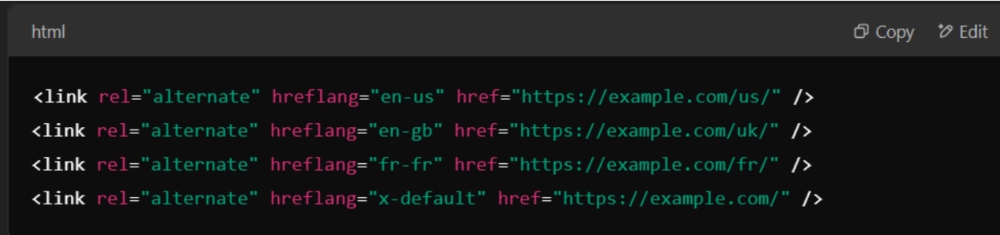
🔹 Tip: The x-default tag is especially important for websites with language selectors, global homepages, or auto-redirect functionalities.
Ensuring Consistency Across Pages
For hreflang to work flawlessly, it must be consistent across all language versions.
✅ Each page must reference all its translated versions.
✅ URLs must be structured correctly to avoid hreflang conflicts.
🚨 Common Mistake (Inconsistent Implementation):
- Page A (English) references Page B (French), but Page B doesn’t return the reference to Page A.
- Some hreflang entries are missing, making search engines ignore the implementation.
✅ Correct Implementation (Consistent Across Pages):
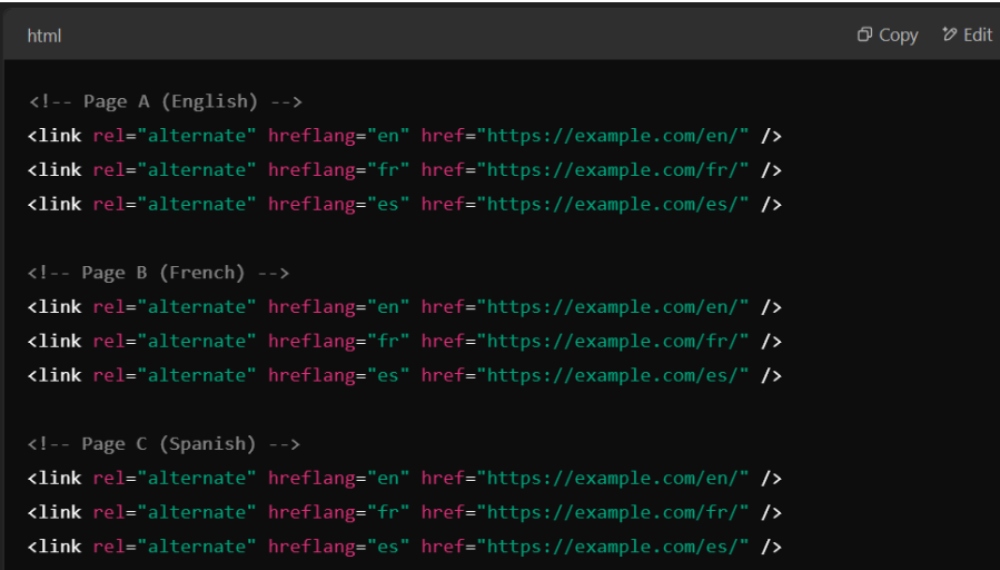
🔹 Tip: Use automated SEO tools to check for missing hreflang return links across pages.
Regularly Testing Your Hreflang Setup
Even if hreflang tags are correctly implemented, errors can still occur due to incorrect configurations, missing return links, or search engine crawling issues.
✅ Google Search Console offers a dedicated hreflang report that helps:
- Identify incorrect hreflang values.
- Detect missing return links.
- Highlight conflicts between canonical and hreflang tags.
🔹 How to Test Hreflang in Google Search Console:
- Go to Google Search Console → Click on your property.
- Navigate to “International Targeting” (under “Legacy Tools and Reports”).
- Check the Hreflang Report for errors and missing tags.
- Fix issues and revalidate the implementation.
Additional Testing Tools:
- Screaming Frog SEO Spider – To check for missing hreflang tags.
- Ahrefs / SEMrush Site Audit – To analyse multilingual SEO errors.
- Hreflang Tag Checker (Chrome Extension) – Quick browser checks.
Tools for Hreflang Validation
Even with careful implementation, hreflang tags can have errors that negatively impact SEO performance and search visibility. To ensure proper functionality, validating hreflang tags using reliable tools is essential. Below are some of the best hreflang validation tools to detect issues, verify implementation, and optimize multilingual SEO.
Google Search Console – What It Can and Cannot Check
✅ Best for: Confirming each language version is indexed and self-canonical; it does not list hreflang errors.
Google Search Console provides a built-in hreflang validation tool under its “International Targeting” report. It highlights errors in the hreflang setup, helping webmasters fix issues that might prevent proper indexing.
How to Check Hreflang in Google Search Console:
- Login to Google Search Console and select your website property.
- Open the URL Inspection tool and test each language version of a page.
- Review the “Hreflang” report to detect errors like:
- Missing return links
- Incorrect language or region codes
- Pages without hreflang annotations
- Fix errors and resubmit pages for indexing.
🔹 Tip: If your hreflang implementation is in an XML sitemap, ensure it’s correctly submitted in the Sitemaps section of GSC.
Hreflang Tag Checker (Chrome Extension)
✅ Best for: Quick hreflang validation directly from the browser.
Hreflang Tag Checker is a Chrome extension that helps verify hreflang annotations on any webpage without needing to check the source code manually.
How to Use It:
- Install “Hreflang Tag Checker” from the Chrome Web Store.
- Visit a page with hreflang implementation.
- Click the extension icon to scan for:
- Hreflang presence and validity
- Return link accuracy
- Incorrect or missing hreflang values
🔹 Tip: This tool is ideal for spot-checking individual pages, but it’s not scalable for large websites.
Screaming Frog SEO Spider – Bulk Hreflang Audit
✅ Best for: Large-scale websites with multiple hreflang implementations (HTML, HTTP headers, XML sitemaps).
Screaming Frog SEO Spider is a desktop SEO crawler that can extract, validate, and analyse hreflang tags across a website. It helps detect:
- Pages missing hreflang annotations.
- Incorrect hreflang codes.
- Duplicate or conflicting hreflang tags.
- Canonical and hreflang misalignment.
How to Perform an Hreflang Audit with Screaming Frog:
- Download and install Screaming Frog SEO Spider.
- Enter your website URL and start the crawl.
- Go to the “Hreflang” tab to analyze detected tags.
- Export the report to review errors and optimize hreflang settings.
🔹 Tip: If your website has thousands of pages, use Google Sheets or Excel to organize and fix errors efficiently.
Chrome Extensions for SEO Audits
✅ Best for: Quick on-page analysis of hreflang and other SEO factors.
Several SEO Chrome extensions can help check hreflang tags and other on-page SEO elements. Some popular options include:
- SEO Minion – Checks hreflang tags and redirects.
- Ahrefs SEO Toolbar – Provides hreflang and link analysis.
How to Use Chrome Extensions for Hreflang Checks:
- Install a Chrome extension (e.g., SEO Minion).
- Visit a webpage with hreflang implementation.
- Open the extension and scan for hreflang errors.
🔹 Tip: Chrome extensions are great for manual validation but don’t work well for large websites requiring bulk hreflang audits.
Hreflang With Pagination, Parameters and Canonicals
Most real-world hreflang failures are not typos. They come from pages that Google does not treat as canonical, because Google reads hreflang only on the URL it has chosen as canonical and ignores it on the rest.
- Paginated category pages. Page 2 of /en/shoes/ should point to page 2 of /fr/shoes/, not to page 1. Each paginated URL needs its own matching set, and each must self-canonicalise. If page 2 canonicalises to page 1, its hreflang is ignored.
- Parameter and filter URLs. URLs like /en/shoes/?colour=red usually canonicalise to the clean URL. Do not add hreflang to them; keep the full set on the clean canonical URLs only.
- Language-only versus language-country. Both are valid.
entargets every English speaker,en-pktargets English speakers in Pakistan. You cannot use a country code alone, and a page may carry bothenanden-usif they point to the same URL. - One method per site. Pick HTML head, HTTP header or XML sitemap and use it everywhere. Mixing methods, or having the head and the sitemap disagree, is a common cause of ignored tags.
- HTTPS and trailing slashes. Every href must be the exact canonical form, including protocol, www and trailing slash. A mismatch counts as a missing return link.
How to Test Hreflang Now That Search Console Has No Report
Google removed the International Targeting report in 2022 and has not replaced it, so testing is now done with third-party tools. A sensible routine:
- Single page check: paste one URL into Merkle's free hreflang tag testing tool (technicalseo.com). It fetches every alternate listed and reports missing return links and invalid codes.
- Whole-site crawl: crawl the site with Screaming Frog SEO Spider and open the Hreflang tab. Filter for missing return links, non-canonical alternates, inconsistent language codes and unlinked URLs. The free version covers up to 500 URLs.
- Ongoing monitoring: Ahrefs Site Audit and Semrush Site Audit both flag hreflang conflicts on every scheduled crawl, which catches regressions after a CMS update.
- Canonical confirmation: use Search Console's URL Inspection tool on one URL per language to confirm that the Google-selected canonical is the page itself. If Google chose another language version as canonical, the hreflang on that page is being ignored.
- Result check: search a branded query from the target country (a VPN or the &gl= parameter helps) and confirm the right version appears.
Hreflang for English and Urdu Sites in Pakistan
Many Pakistani businesses publish pages in English and Urdu, or serve Pakistan and the Gulf from one site. Here is how hreflang handles those cases.
Codes you will use
| Audience | hreflang value |
|---|---|
| Urdu speakers, any country | ur |
| Urdu speakers in Pakistan | ur-pk |
| English speakers in Pakistan | en-pk |
| English speakers in the UAE | en-ae |
| Everyone else | x-default |
Example for an English and Urdu page
Place the same set of tags on both versions:
<link rel="alternate" hreflang="en-pk" href="https://example.com/en/services/" />
<link rel="alternate" hreflang="ur-pk" href="https://example.com/ur/services/" />
<link rel="alternate" hreflang="x-default" href="https://example.com/en/services/" />
Tips for Urdu pages
- Write real Urdu content, not Roman Urdu mixed with English, on the Urdu version. Roman Urdu searches are usually best served by English-script pages.
- Set
lang="ur"anddir="rtl"on the Urdu page so text displays and is read correctly. - Keep URL slugs in English letters for easier sharing, even on Urdu pages.
- Only add hreflang for pages that actually exist in both languages. Do not point Urdu hreflang at an English page.
Frequently asked questions
Do hreflang tags redirect users to the right language?
No. Hreflang tags only help search engines choose which version to show in search results. They do not move anyone who lands on the wrong page. If a visitor arrives on your English page from a direct link, they stay there. Add a clear language switcher, or a banner suggesting the better version, so people can move to the right page themselves.
Is hreflang a ranking factor?
Not directly. Hreflang does not make a page rank higher. It helps Google swap in the most suitable version of a page that already ranks, such as showing your en-gb page to UK searchers instead of your en-us page. The benefit is better relevance and click-through in each market, not a ranking boost on its own.
Does Bing support hreflang tags?
Bing has said it treats hreflang as a weak signal and relies more on the content-language meta tag, the lang attribute on the HTML element, and other location clues. If Bing traffic matters to you, set the html lang attribute correctly on every page and keep each language version clearly written in that language, as well as using hreflang for Google.
Do I need hreflang if my site has only one language?
No. Hreflang is only useful when you have two or more versions of a page for different languages or regions. A single-language site targeting one country, such as an English site for Pakistan, does not need it. Setting the correct html lang attribute and focusing on local content and a Google Business Profile will do more for you.
Where is the hreflang report in Google Search Console?
There is none. The International Targeting report, which listed hreflang errors and return-link problems, was removed in 2022 and nothing replaced it; the URL Inspection tool does not show hreflang data either. As of October 2026 the practical options are a crawler such as Screaming Frog (Hreflang tab), the hreflang checks inside Ahrefs or Semrush Site Audit, or Merkle's free hreflang tag testing tool for a single URL set. Use URL Inspection only to confirm which canonical Google chose for each version.